redmine-mcp-server: Redmine project management for AI agents
redmine-mcp-server is an open-source MCP (Model Context Protocol) server that lets AI agents read and manage a Redmine instance: issues, projects, wikis, time tracking, versions, Gantt data, files, and contacts. It ships as a Python package and a container image, and connects to Claude Desktop, Claude Code, Cursor, VS Code Copilot, Codex CLI, Kiro, and any MCP-compatible client. Its integration suite passes in full against Redmine 6.1 and 7.0.
What it does
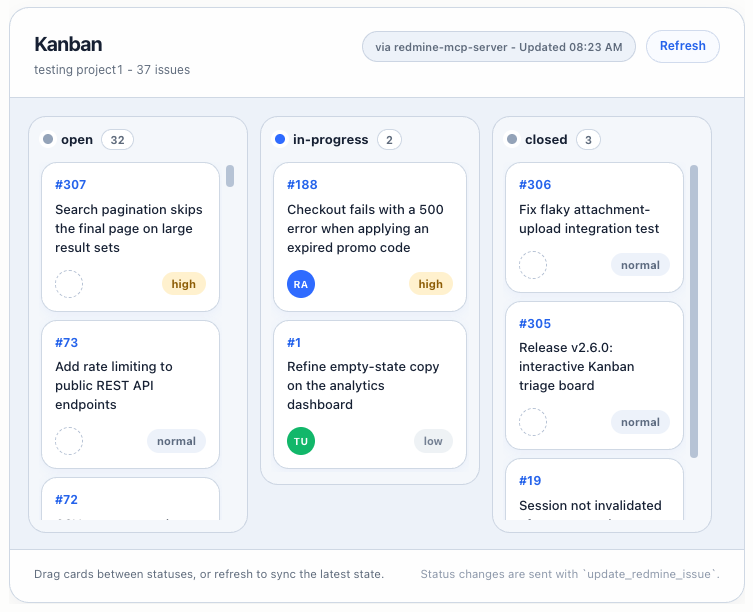
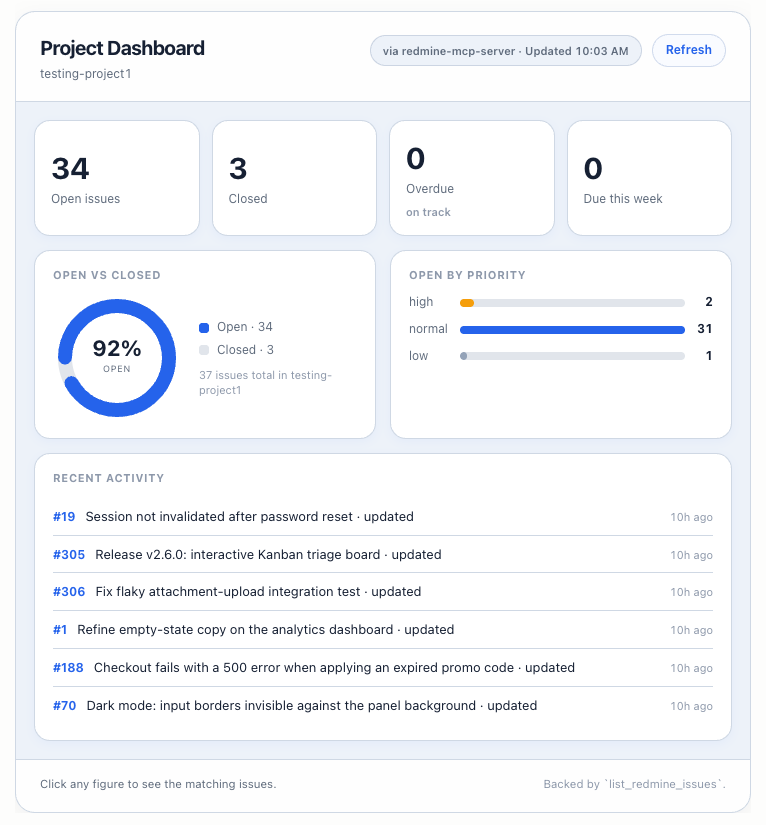
Redmine has a capable REST API, but wiring an agent to it directly means handing the model raw HTTP access, which is slow, error-prone, and unsafe. redmine-mcp-server exposes 51 purpose-built tools instead. An agent can list and filter issues, read a ticket with its full history, update status and assignee, add notes, log time, manage wiki pages, pull Gantt timelines, upload and download attachments, and run global search, each as a single typed tool call with predictable, serialized JSON. It can also render interactive apps directly in the chat through the MCP Apps extension: show_triage_board draws a project's issues as drag-and-drop status columns that write back to Redmine, and show_project_dashboard renders a live, read-only project snapshot with click-through drill-ins to matching issue lists.
How it stays safe
The server runs on your own infrastructure and talks only to your Redmine and your MCP client. A read-only mode (REDMINE_MCP_READ_ONLY=true) blocks every write while you evaluate. In OAuth mode, each tool call is checked against the Redmine permission scopes the tool actually uses, per action for the manage_* tools, with unmapped tools denied by default and tools/list filtered to the token's scopes. User-controlled text is wrapped in boundary tags before it reaches the model, URL-based uploads are SSRF-checked, and issue deletion requires explicit confirmation with a cascade-impact preview.
What the demo shows
The browser demo is a scripted simulation of a triage workflow against canned data. The JSON returned by each tool matches the real server's response shape field-for-field, including the <insecure-content> boundary tags that wrap user-controlled text (descriptions, notes, comments) so an LLM treats them as untrusted data rather than instructions. Nothing connects to a live Redmine; the point is to show the agent's tool loop, not to be a hosted service.
Install
redmine-mcp-server is MIT-licensed and published on PyPI. Install with pip install redmine-mcp-server, then point it at your Redmine URL with an API key, OAuth2, or per-user auth. The source is on GitHub and the package on PyPI. For a full tour of the server, see the launch post on giving AI agents live project data. For the story behind it, see the blog post on linking a legacy system to a modern AI agent.